


The Great Courses
3.61.29K Reviews
App Specs
- Version
- 9.0.1
- Updated On
- License
- Free
- Downloads
- 1,000,000+
- Developer
- The Teaching Company
- Categories
- Education
- Platform
- Android
Screenshots
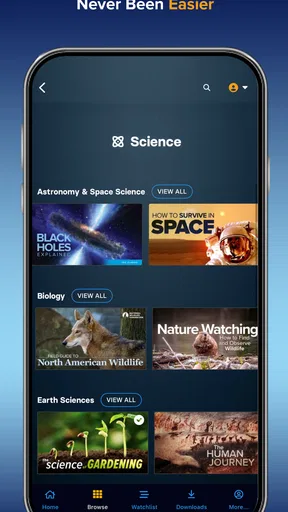
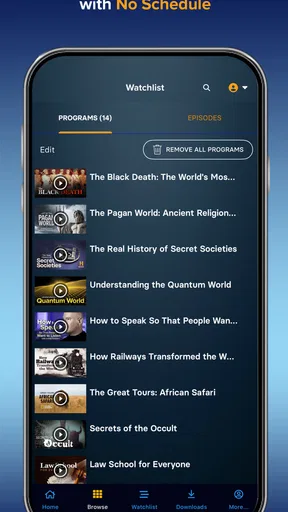
 Analysis by AppCompare
I judge an education app by a practical question: does it help me make good use of the time I actually have, or does it just give me another library to browse? The Great Courses is aimed at people who want longer-form learning from guided lessons, rather than a quick answer or a string of short clips. That makes it a better fit for a curious listener or viewer who enjoys following a subject over time than for someone who only needs help with one task.
The app is free to install, and The Teaching Company is the developer behind it. Its Teen age rating is worth noting for families, while the paid course options are the bigger decision for most adults: you can explore before deciding whether the learning format and topics suit you. I would treat the initial download as a chance to assess the catalogue and the way lessons are presented, not as a promise that every course is free.
Choose it for depth, not a quick fix
The key distinction is the kind of learning you want. Search engines and short video platforms are usually faster when you need one definition, a repair instruction, or a brief overview. A conventional online class may be a stronger choice if you need assignments, deadlines, direct instructor feedback, or a credential. This app sits between those options: it is for spending time with an organized course and an engaging expert, without making every study session feel like formal school.
That format works especially well when a subject is interesting but not urgent. I might use a course on a commute, during a quiet evening, or while doing a low-attention household task if the audio carries the lesson well. For a topic that depends on maps, demonstrations, or visual detail, I would save the video for a time when I can look at the screen. Thinking about that distinction before choosing a course can prevent the common mistake of starting a visually rich lesson when I only have time to listen.
Make a course fit into an ordinary week
A realistic routine could be to choose one course on Sunday, then watch or listen to a small portion during a few breaks across the week. The useful trick is to decide in advance what counts as a good session: one lesson, a particular question to answer, or enough time to take a couple of notes. That gives the course a place in the day without turning leisure learning into another demanding schedule.
Downloads can be helpful if you expect unreliable connectivity, but I would plan them while connected rather than wait until a train platform or airport. Offline access also makes it easier to separate learning from scrolling: open the lesson you chose, focus on it, then stop. If the app’s progress tools are available for the course, they can help you pick up where you left off; a brief note in your own words is still a better way to check whether you can explain the idea later.
Browse with a question in mind
With a broad catalogue, browsing can become its own distraction. I get more value by starting with a question—such as why a historical event unfolded as it did, or what makes a style of photography distinctive—then looking for a course that promises a sustained treatment. A playlist can bring different subjects together, but I would keep it small enough to finish. Mixing history and art can keep learning fresh; stacking too many unrelated courses can make it harder to remember what I have already covered.
Worth Reading Before You Choose

EA SPORTS FC Mobile 26 Is a Bigger Football Game, but It Takes Time

Flipboard Shows What News Apps Must Do Beyond the Feed

Switching to Android Auto Means Rethinking Your Driving Routine

Google Calendar Makes a Crowded Week Easier to Manage

Ludo King Makes the Most of the Minutes Between Plans

Baby Panda World Brings Quick Play to Modern Phones, but Its Game Library Feels Busy
Ratings and other learners’ comments can help narrow the choice, but I would use them as clues rather than guarantees. A popular course may still be the wrong pace or level for me. Before committing, I would look at the topic, the instructor’s approach, and whether I want to learn by watching or listening. The app’s average rating is 3.5 from around 3,800 ratings, with about 1,300 written reviews, so opinions are mixed enough that checking course details for yourself makes sense.
What Is The Great Courses App All About?
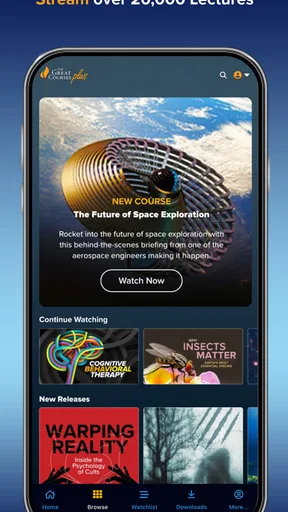
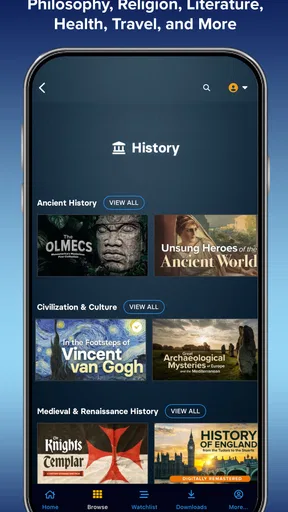
The Great Courses app gives you access to a vast library of courses on a variety of subjects, ranging from history and philosophy to cooking and photography. It’s like having a treasure trove of knowledge right in your pocket. The app is available on both Android and iOS, making it super accessible for most smartphone users.
The interface is pretty straightforward. Once you download the app, you’ll find a clean and intuitive layout. You can browse through different categories or use the search function to find something specific. It’s user-friendly, even for those who aren’t super tech-savvy.
The Learning Experience
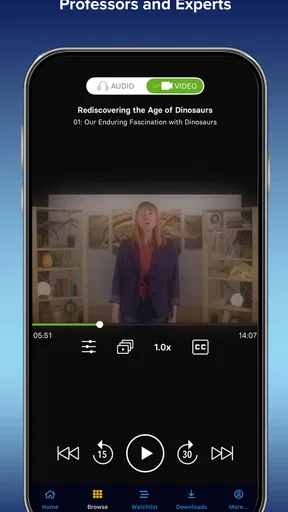
One of the first things that struck me was how engaging the courses are. The instructors are top-notch, often experts in their field, and they know how to keep you hooked. I tried a course on ancient history, and it felt like I was right there, journeying through time. The video quality is great, and the audio is clear, which makes a huge difference when you’re trying to absorb information.
Another cool feature is the ability to download courses for offline viewing. This is perfect for those of us who are always on the go or stuck in areas with spotty internet. Just download your course when you’re connected to Wi-Fi, and you’re good to go.
Customizing Your Learning Path
What I love about this app is that it tailors the experience to you. You can create a personalized playlist of courses, so you’re not restricted to a single topic. Feeling like a bit of science, then a splash of art? No problem. The app lets you mix and match as you like.
The app also includes features like progress tracking and quizzes, which help reinforce what you’ve learned. It’s like having a little nudge to keep you motivated and ensure you’re not just watching passively.
Community and Interaction
While the app doesn’t have a full-fledged community feature, it does allow you to rate courses and see what others are saying. This can help you decide which courses are worth your time. Plus, it’s always nice to know you’re not the only one tackling a challenging topic.
I did find myself wishing there was a bit more interaction, like forums or discussion boards, where users could chat about what they’ve learned. Maybe that’s something to look forward to in future updates!
Is It Worth It?
Now, let’s talk about the cost. The app itself is free to download, but the courses come with a price tag. You can buy individual courses or opt for a subscription model, which gives you access to a wider range of content. In my opinion, if you’re serious about expanding your knowledge, the investment is worth it. The variety and quality of the courses make it a valuable resource.
That said, it might not be for everyone. If you’re looking for quick, free tutorials, this app might not fit the bill. But if you’re after in-depth, comprehensive learning experiences, then it’s definitely worth considering.
Final Thoughts
Overall, The Great Courses app is a fantastic tool for anyone eager to learn. It offers high-quality content on a wide range of topics, presented by experts who know how to make learning exciting and accessible. Whether you want to delve into a new subject or master a hobby, this app could be your go-to resource.
So, if you’re ready to embark on a learning adventure, why not give it a try? Download the app, explore the courses, and see where your curiosity takes you. Happy learning!
Budget for the way you plan to learn
The in-app purchases range from $19.99 to $179.99 per item, so I would check the price attached to a specific course or access option before getting invested in it. The free app is a low-commitment way to see whether the interface suits me, but it should not be confused with free access to the full catalogue. If I am comparing a one-off purchase with a broader subscription, I would first ask how many courses I realistically expect to use; paying for breadth only makes sense if I will actually explore beyond one title.
There is also a small cost of switching once I begin. Time spent on a course is not wasted if I stop, but a paid selection is less useful if I discover that I prefer short, practical tutorials or need a teacher to respond to questions. I would sample the app’s browsing and lesson style first, choose a topic I already care about, and make a deliberate purchase only when I can name what I want to learn from it.
Who will get the most from it
For a self-directed learner, the strongest reason to choose this app is the combination of an expert-led presentation and room to follow curiosity across subjects. It can suit someone who wants context around a topic rather than a quick set of instructions, or a hobbyist who enjoys learning at their own pace. The catalogue’s range can also help a household member move from one interest to another without needing a separate app for every subject.
I would be more cautious if I needed a course to produce a measurable work outcome, a formal qualification, or regular feedback. In those cases, a structured class or a specialist tutorial may be a better use of time and money. It is also not my first pick when I need to practise a hands-on skill while following exact steps: a focused demonstration or reference guide is easier to pause, copy, and revisit than a broad lecture.
Check the fit before settling in
The app has been available since August 2, 2015, and its current version is 8.0.3. It has more than 500,000 installs, which suggests it has found an audience among people looking for this kind of educational content, though popularity alone cannot tell me whether a particular course will suit my interests. If you use an older device, check that it meets the stated minimum operating system requirement of version 8.0 before planning to rely on the app.
One practical question is whether a course will work for the way you learn. I would start with a subject I genuinely want to understand, then try a short listening session and a screen-focused one if the course includes video. That quick comparison tells me whether the instructor’s pace, the audio, and the visual material are a good match. If I keep pausing because the lesson assumes background knowledge I do not have, I would choose a more introductory resource rather than push through out of obligation.
My recommendation is to treat this as a considered learning library, not an endless feed. It is a good choice when you want expert-led depth, can set your own pace, and are comfortable checking the cost before committing. If your priority is free bite-sized answers, classroom-style interaction, or a specific practical result, another kind of education app or course may serve you better. For a curious learner who wants to make a commute or a quiet evening feel more worthwhile, I think it is well worth exploring.
Pros
- Wide range of topics available.
- High-quality video content.
- Expert instructors lead courses.
- Download for offline access.
- User-friendly interface.
Cons
- Requires subscription for full access.
- Limited interactivity in courses.
- No live Q&A sessions.
- Some courses can be lengthy.
- App can be resource-heavy.
FAQs for The Great Courses
What is The Great Courses app and how does it work?
The Great Courses app is an educational platform offering a wide range of video and audio lectures from top professors and experts. Users can stream or download courses on diverse subjects like history, science, and arts. The app provides flexible learning options, allowing users to learn at their own pace, either online or offline.
Is there a subscription fee for The Great Courses app?
Yes, The Great Courses app typically operates on a subscription model, providing users access to a vast library of courses. While there are free previews available, a subscription is required for full access. The app often offers various subscription plans, including monthly and annual options, to suit different learning needs and budgets.
Can I access The Great Courses content offline?
Absolutely. The app allows users to download lectures and courses for offline viewing, which is perfect for those who want to learn on the go without relying on a constant internet connection. This feature ensures that users can continue their educational journey even when traveling or in areas with limited connectivity.
Are the courses on The Great Courses app suitable for all ages?
The Great Courses app offers content primarily aimed at adult learners, with a focus on college-level lectures and advanced topics. However, many courses can be suitable for younger audiences, especially those interested in expanding their knowledge. It's advisable for parents to preview content if younger users are interested.
What devices are compatible with The Great Courses app?
The Great Courses app is available for both Android and iOS devices, ensuring a broad range of compatibility. Users can install the app on smartphones and tablets, allowing for flexibility in how and where they choose to learn. Additionally, some content may also be accessible via web browsers on desktop computers.


